How to schedule monthly / weekly transactions
Create a scheduled transaction
To create a new automatic transaction, click the "Scheduled transactions" menu, then the "Add a scheduled transaction" button.


Fill in the form, not forgetting the frequency of the transaction: monthly, weekly, quarterly, yearly, every two months, or custom for any frequency you like.
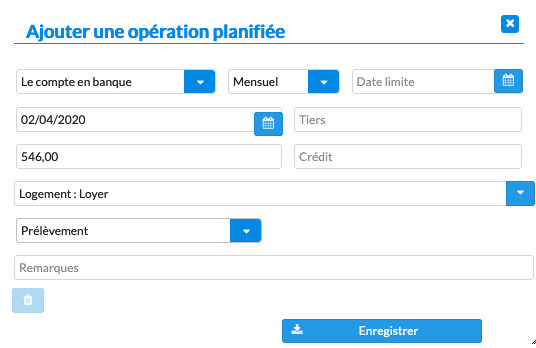
Finally, click "Save" to create the transaction.
When are these automatic transactions run?
Running scheduled transactions is an automatic task that creates the corresponding transactions in your bank accounts. This task runs whenever a user who is allowed to view the account signs in: you, as well as anyone you have shared the account with.
How do I force automatic transactions to run?
Select the scheduled transactions you want to run by checking the checkbox on the right of the table, then click "Run now".

How do I create a scheduled savings or transfer transaction?
If you manage several accounts, you can create automatic transfers. Select the current account, choose "Transfer" as the payment method, then check "Split transaction" to specify the destination account. Two transactions are then created, one in each account.
